
In the UK, it’s crucial for drivers to ensure all their driving documents are valid and up to date before hitting the road. With paper tax discs and driving licence counterparts now abolished, the process has moved online, making it easier to perform quick checks for car tax, MOT status, insurance, and driving licence details. This guide will walk you through how to check your car tax online, verify your MOT status, confirm your car insurance is active, and ensure your driving licence is valid. We’ll also point out official tools (with links to GOV.UK) and offer some tips for UK drivers and travellers preparing for trips. Whether you’re gearing up for a domestic journey or planning to hire a car abroad, these checks will help you stay legal, avoid fines, and travel with peace of mind.

Cars on UK roads must be taxed, insured, and have a valid MOT, digital tools make it easy to verify these before a trip.
Checking Your Vehicle Tax (Road Tax/VED) Status
Every vehicle used or parked on UK public roads must be taxed (formally known as Vehicle Excise Duty, or VED) unless it’s declared off the road (SORN). It’s no longer as obvious as looking for a paper tax disc on the windscreen, you’ll need to use an online checker. To check if your car tax is valid online, use the DVLA’s free vehicle tax checker. This official tool will tell you whether your vehicle’s road tax is up to date or if it’s registered with a SORN (Statutory Off-Road Notification). All you need is the vehicle’s registration number (number plate) to get an instant result. If you’ve recently paid your tax or declared SORN, note it can take a couple of days for records to update.
- How to check: Visit the GOV.UK “Check if a vehicle is taxed” service and click “Start now.” Enter your car’s registration number and make. The system will confirm if your vehicle is taxed and when the tax is due to expire. It will also show if the car has a current MOT (more on MOT checks below). Using this service is free.
- If your car isn’t taxed: You’ll see a status like “Untaxed” or an expired date. It’s illegal to keep an untaxed vehicle on the road, so you should renew the tax immediately. You can tax your vehicle online via GOV.UK if needed (you’ll need your V5C logbook reference). Driving an untaxed vehicle can result in an automatic fine of £80 (reduced to £40 if paid quickly) and potentially a penalty up to £1,000 if not settled. Untaxed vehicles found on the road can also be clamped or towed by the DVLA, so it’s worth confirming your status.
- SORN vehicles: If you’ve taken your car off the road and filed a SORN, the checker will confirm that status. Remember, using a SORNed vehicle on public roads carries heavy penalties (up to £2,500 fine in serious cases). Only drive once you have re-taxed the vehicle.
- Exempt vehicles: Some vehicles (e.g. certain historic or electric vehicles) may be exempt from road tax, but you still need to register them as taxed. The checker will show if no payment is needed. (See the official list of tax-exempt vehicles on GOV.UK for details.)
- Changes to car tax: Note that car tax rules changed on 1 April 2017, rates for newer cars are now based on a flat fee plus emissions and list price, whereas cars registered before that date follow the old CO2-based system. If you’re curious about how the 2017 VED changes affect your vehicle, check out our guide to the 2017 road tax changes (APH article) for a full breakdown. Internal combustion engine drivers, especially of newer models, should be aware of potential hikes (some new car owners now pay £100s more over the first 3 years than they would have pre-2017).
Pro tip: The DVLA has also made it convenient to get reminders; you can sign up for email or text alerts for when your vehicle tax is due each year. This helps avoid inadvertently falling into an untaxed status. And if you use Amazon Alexa, there’s even an DVLA Alexa Skill that lets you ask “Alexa, is my car taxed?”, it will tell you your tax and MOT due dates once you’ve enabled the skill and linked your account. It’s a handy 21st-century way to ensure you stay on the right side of the law!
(Related: If you’re driving an electric or very low-emission vehicle, keep an eye on upcoming tax changes, from 2025, even EVs will no longer be exempt from VED. Our APH blog on green motoring tax changes covers what to expect.)
Checking Your MOT Status and History
An MOT is the annual test of vehicle safety and roadworthiness required once your car is over 3 years old. Driving without a valid MOT certificate can lead to a £1,000 fine and can even invalidate your insurance. Fortunately, you don’t need to rummage through glovebox papers to know if you’re up to date, the DVLA’s online service lets you check your MOT status and full history in seconds.
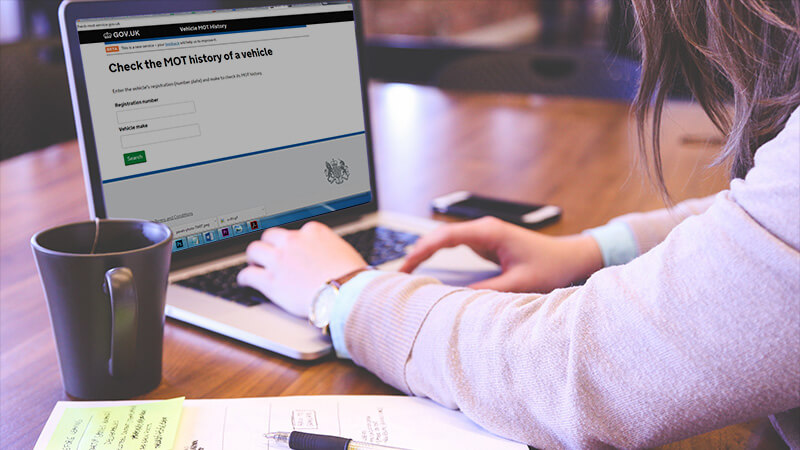
- How to check MOT status: Go to the GOV.UK “Check MOT status” page and enter your vehicle’s registration number. This will tell you if the vehicle currently has a valid MOT and the expiry date of the MOT. For a deeper dive, use the “Check MOT history” service, which shows all MOT test results since 2005 for cars in England, Scotland, and Wales. You’ll see passes, fails, advisory notes, and mileage records, extremely useful information if you want to review how well a car has been maintained over time. (Northern Ireland records are available from 2017 onward.) This service is free and only requires the reg number.
- MOT reminders: The site will also let you set up free MOT reminders by text or email, so you’ll be alerted when your next test is due. Given that an MOT is annual, it’s easy to forget, setting a reminder helps you avoid accidentally driving post-expiry.
- Reviewing the MOT history: When viewing the history, pay attention to patterns. Numerous past failures or repeated “advisory” warnings (issues that passed but need attention) could indicate the car wasn’t well cared for. Inconsistent mileage readings (e.g. mileage dropping between tests) are red flags for odometer tampering. If you’re buying a used car, reviewing the MOT history online is essential homework – it gives you insight into potential hidden problems and maintenance history that a seller might not volunteer.
- Digital MOT certificates: While garages still provide a paper MOT certificate when you pass, that piece of paper is essentially just a receipt now. The real record is the digital database. In fact, the Driver and Vehicle Standards Agency (DVSA) advises buyers not to rely on a paper certificate alone but to always verify it online. There have been cases of fake MOT papers, so using the official checker is the safest bet.
- If your MOT has expired: Remember, you cannot drive (other than directly to a pre-booked MOT appointment) if your MOT is expired. The police and automated cameras can instantly tell if a car’s MOT is invalid. An expired MOT could result in your car being considered unroadworthy, and as mentioned, penalties are severe. So if the check shows you’ve missed your date, schedule an MOT test immediately before driving again.
- MOT changes: Keep in mind that MOT rules can evolve. For example, in May 2018, the MOT test got stricter for diesel cars (introducing new emissions checks). There’s also ongoing discussion about changing the frequency of the first MOT (from 3 years to 4 years for new cars). Nothing has changed yet as of 2025, but stay tuned to official announcements. You can always find the latest rules on GOV.UK, and we’ll update our guides accordingly. (If you drive a diesel, you can read our summary of the 2018 MOT changes in our MOT changes guide on APH.)
Did you know? Instead of manually checking, you can ask Alexa to check your MOT due date as well. The same DVLA Alexa Skill mentioned earlier will respond with your MOT status when you provide your car’s registration. It’s available 24/7, useful for a quick reminder while you’re busy doing other things.
Checking Your Car Insurance Status
All vehicles driven on UK roads must be insured at least to the third-party liability level. Driving without insurance is a serious offence; enforcement is two-fold: there’s Continuous Insurance Enforcement (fines for merely keeping an uninsured car) and on-the-spot penalties if you’re caught actually driving uninsured. To avoid any doubt, you can use the Motor Insurance Database to perform a UK car insurance check on your own vehicle for free.

- How to check insurance: Use the askMID online service (now part of the Motor Insurers’ Bureau “Navigate” system) to check your car’s insurance status. Enter your vehicle registration number and confirm a few basic details, the site will then tell you if the vehicle is currently insured on the day of the check. It’s a simple yes/no lookup against the national database (MID). Note that it will not show your policy details, dates, or insurer info, just whether a valid policy exists. This free check is intended for your own vehicle (or one you are permitted to use). Using it for any car you’re not associated with is against the terms.
- Third-party insurance checks: If you’ve been in an accident or need to check someone else’s vehicle (and you have a valid reason), there is a separate paid service via askMID. For around £10, you can request insurance details of another vehicle, you’ll get the insurer’s name and policy number if available. This is typically used after collisions when the other party isn’t forthcoming with their insurance information. You’ll need to declare the reason and details of the incident to use this service. (If none of the lawful reasons apply, the system won’t allow a lookup on someone else’s car.)
- Continuous Insurance Enforcement (CIE): The law requires that every vehicle must be insured at all times unless it’s off the road and SORN. This means even if you’re not driving your car (e.g. it’s in the garage for a month), you can be penalised for having it uninsured without a SORN. The DVLA cross-checks the MID database and can issue an automatic fine of £100 for any registered vehicle that shows up as uninsured. If you get a letter about this and don’t respond, it can escalate to court with a fine up to £1,000. So, doing an occasional insurance check on your car, especially if you suspect an admin error or you’ve recently changed insurers, is wise to avoid unwelcome surprises.
- Driving without insurance: The consequences if you are stopped by police while uninsured are even more severe. It’s an offence carrying an on-the-spot £300 fine and 6 penalty points on your licence. If it goes to court, you could face an unlimited fine and even a driving ban. Plus, the police can seize and impound your vehicle immediately, and even destroy it in some cases. In short, never drive without at least the legal minimum insurance. If you’re unsure about your coverage (for example, after switching providers or if a direct debit payment failed), checking the MID will confirm your status.
- No more insurance certificates: In the past, drivers received a paper insurance certificate and had to produce it when asked. Nowadays, police and cameras rely on the electronic database. Insurers update the Motor Insurance Database when you start or end a policy. You’re not required to carry an insurance certificate in the car, and most insurers email documents rather than post them. Just ensure your policy is active and the details (vehicle registration, your name/address) are correct. If you change any details or renew your policy, the new info should be reflected on MID within a few days, you can re-check on askMID if needed.
Note: You are only allowed to use the free askMID check for vehicles you own/insure or are permitted to drive. Insurance brokers and employers can also access it for their fleet. It’s illegal to use someone else’s details to sneak a peek at a vehicle that’s nothing to do with you. The paid route (with justification) is there for third-party inquiries. MIB takes misuse seriously, so stick to checking your own car’s insurance status (or your company’s vehicles as appropriate).
Checking Your Driving Licence Details and Validity
Since June 2015, the paper counterpart of UK photocard licences is no more, all your driving licence information (vehicle categories, penalty points, endorsements, etc.) is stored online with the DVLA. It’s important to make sure your driving licence is valid and that the details DVLA holds (e.g. your current address and any penalty points) are accurate. You’ll especially need to do this if you plan to hire a car (in the UK or abroad), as rental companies often require a licence check code or printout. Here’s how to check your licence info online:
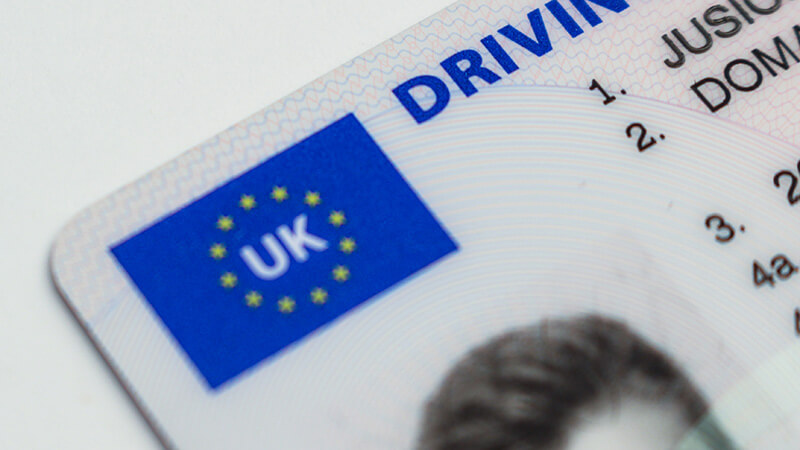
- How to check your licence: Use the GOV.UK “View or share your driving licence information” service. To log in, you’ll need: your driving licence number, National Insurance number, and the postcode on your licence. Entering those will allow you to view your driving record. This includes what types of vehicles you can drive, the status of your licence (valid, or if you’re disqualified), any endorsements or penalty points, and the licence expiry dates. It essentially replicates all the info that used to be on the paper counterpart (and more). Make sure all the details are correct, e.g. your name is spelt right and your address is up to date. Driving with an out-of-date address, for instance, can technically land you a fine up to £1,000! (It’s easy to update online for free if you’ve moved – don’t put it off).
- Check code for car hire: The DVLA service also lets you generate a one-time use “check code” to share your licence details with a third party (like a car rental company). This code is a combination of letters and numbers you can give to the hire company so they can see any points or restrictions. It’s valid for 21 days and then expires. If you’re renting a car, you may be asked for this code at the rental desk, so it’s best to create one shortly before you pick up the car (within 21 days of your rental date). The website has a specific button to “Share licence info” which generates the code and also gives you the option to print or save a PDF of your licence summary. Many hire companies accept the printout as well. (Our article “Hiring a Car Abroad: Everything You Need to Know” goes into more detail on this process and other documents you might need – worth a read if you’re planning to drive overseas.)
- Verify your details: While you’re viewing your licence, double-check that your personal details match your actual licence card. If you notice any errors (e.g. points you don’t recognise or an old address still listed), contact DVLA to have it corrected. Remember, it’s your responsibility to update your licence when you move home – it’s free and can be done online, and avoiding it could cost you in fines. Also, ensure your licence hasn’t expired (photocard licences need renewing every 10 years, the “4b” date on the card).
- Lost counterpart or old paper licence holders: If you still have the older style paper-only licence (issued before photocard licences), that paper is still valid by itself until you’re 70 or until details change. The online service works for those too, you can view any points on your paper licence. Since there’s no photocard, you might need to present an additional ID (passport) when hiring a car, along with a check code. For those who had a photocard plus a paper counterpart, note that the counterpart is now irrelevant and no longer issued; everything is managed online.
- Why check your licence? It’s a good idea to periodically check your licence, especially if you’ve recently taken a speed awareness course or had any endorsements, to ensure they’ve been updated correctly. If you’re paying more for insurance than expected, it could be worth verifying that old expired points have been removed from your record when they should have been. The licence check can also reveal if you accidentally got points without knowing (it’s rare, but for example, if a minor ticket went to an old address). Better to catch and address that sooner than find out later when you have a court summons or a refused insurance claim.
Important: If you find you have endorsements (points) on your licence that are spent or incorrect, you can contact DVLA for clarification. Most points stay on record for 4 years (although often only count towards totting-up for 3). The online record will show valid and expired points. If you need to provide proof of your driving record to an employer or foreign authority, you can use the same DVLA service to either share a code or print the details, there’s no need for the old paper counterpart at all.
(Need to change your licence address or update your photo? Our guide on how to change the address on your UK driving licence walks you through the simple online process. Don’t delay, as having an outdated address on your licence could lead to trouble.)
Other Useful Online Resources for Drivers
Beyond the big four checks above, here are a few more handy resources and tips that UK drivers (and travellers) should know about to avoid fines and hassles:

- Change the address on your licence: As mentioned, keeping your licence up to date is a legal requirement. If you move house, you can update your driving licence address online in a few minutes (you’ll need your licence number, new postcode, and possibly your National Insurance number). It’s free of charge. Failing to inform DVLA of an address change can lead to a £1,000 fine if discovered, so don’t overlook it.
- Have I paid the Dartford Crossing charge? If you use the Dartford Crossing (bridge/tunnel on the M25 east of London), you must pay the Dart Charge by midnight the day after crossing. Many people pay online but worry if the payment went through. There’s now a way to check if your Dart Charge payment was received, visit the official Dart Charge website and log into your account, or use their payment checker with your vehicle registration and payment reference. If a payment didn’t register and you drove across, you could receive a Penalty Charge Notice (£70, reduced to £35 if paid quickly). Our detailed Dartford Crossing guide (APH article) explains how to pay, how to verify your payment, and what to do if you get a fine. It’s worth bookmarking if you use this route regularly, so you can avoid unwitting fines when travelling to or from the continent.
- London Low Emission Zone (LEZ) & ULEZ checks: Driving in Greater London with certain vehicles (larger vans, lorries, buses, motorhomes, etc.) may incur emissions charges if they don’t meet standards. The Low Emission Zone (LEZ) covers most of London 24/7 and primarily affects heavy diesel vehicles. There’s also the Ultra Low Emission Zone (ULEZ) for all vehicles in inner London (as of 2025, expanded to the whole of Greater London). If you’re taking a van or other vehicle into London, use TfL’s vehicle checker tool to see if your vehicle is subject to charges. Penalties for not paying these can be steep (typically £160, reduced to £80 if early, for ULEZ; £250 for LEZ), and they apply each day you drive within the zone. It’s better to know before you go!
- Find out who owns a vehicle (V888 form): Perhaps you need to contact a vehicle’s owner – for example, someone’s car is blocking your driveway regularly, or you were involved in a minor hit-and-run and got the plate number. The DVLA can release another vehicle’s registered keeper information to you if you have a valid reason, but you have to apply by post using form V888 and pay a small fee (currently £2.50 for individuals). You can download the form from GOV.UK, fill it in with the vehicle details and reason, and send it to DVLA. They will reply by post if they decide your request is legitimate. This isn’t an instant online check, it’s a process that takes some time and justification. (For most situations like accidents, the police or insurance will handle this for you. But it’s good to know the option exists for specific circumstances.)
- Driving abroad documents: If you’re taking your car to Europe or renting one abroad, ensure you have the right documents for travel. This includes your driving licence (and possibly an International Driving Permit in some countries if you have an older paper licence or are travelling outside Europe), your insurance Green Card (proof of insurance, which you can request from your insurer, nowadays often not required in the EU, but rules can change), and for rentals, the DVLA licence check code as discussed. We have a comprehensive APH guide on driving in the EU after Brexit which covers what extra papers you might need, from Green Cards to GB (UK) stickers. Safe travels!
FAQ – Common Questions on UK Driving Documents
You can check your car’s tax (VED) status by using the DVLA’s official online vehicle enquiry tool. Go to the Check if a vehicle is taxed, GOV.UK page, click “Start now,” and enter your registration number. The site will tell you if your vehicle is taxed and until what date. It will also indicate if the car is SORN (off-road). This service is free. If the result shows your tax has expired, you should renew the tax immediately to avoid fines. Remember that driving an untaxed vehicle on the road can lead to an £80 fine (or more if not paid) and up to £1,000 in court penalties.
Use the Check MOT status service for a quick expiry date lookup, or the Check MOT history service for full details. Both are on GOV.UK and require your vehicle’s registration number. The MOT status check will show if your car currently has a valid MOT and when it’s due to expire. The history service lets you see past results (pass/fail), any reasons for failures, advisory notes, and recorded mileages. This is useful for spotting patterns or potential issues when buying a used car. If your MOT is due soon or just expired, you’ll need to book a test at an MOT garage. Remember, no MOT means you cannot drive the car (except to a pre-booked test) and you risk a £1,000 fine if you do. Consider signing up for MOT reminders by text/email so you don’t forget.
To confirm you have valid insurance on your vehicle, use the free askMID lookup. Go to askmid.com and enter your vehicle’s reg. If your car is insured, the result will simply show “Insurance FOUND” (or similar wording) along with the make/model of your car. If it says not insured, then your vehicle isn’t showing as covered on the Motor Insurance Database, in which case, contact your insurer immediately or you may need to insure it or declare SORN. The askMID check won’t display your insurer’s name or your policy details (for privacy reasons). If you’ve forgotten who you’re insured with, check your emails for the policy or bank statements for payments, as that info won’t come from the askMID tool. In an accident situation where you need a third party’s insurance details, you can use the Motor Insurers’ Bureau’s paid service as mentioned (about £10), this will give you the other driver’s insurer and policy number if you provide a valid reason (like a collision). Always ensure you have at least third-party insurance on any car you drive; driving uninsured carries heavy penalties.
You can view all your driving licence details online via the DVLA’s View Driving Licence service. Log in using your licence number, National Insurance number, and postcode. Once logged in, you can see what classes of vehicles you’re allowed to drive, your licence’s expiration date, and any endorsements or penalty points on your record. If you have points, it will show how many and what they were for, along with the dates. This is effectively the digital version of the old paper counterpart. Ensure your personal details are correct too (name, address, etc.). If your photocard licence has expired or is about to (they last 10 years), you need to renew it, the service will indicate this as well. While checking, you can also generate a check code for sharing your licence with others (like car hire companies); that option will be on the same site. Your licence is valid as long as it’s not expired or revoked, and keeping your address updated and paying any renewal fees on time will maintain its validity. If you still have a green paper licence that’s unexpired, it’s valid, but you can still use this online service to check your details.
A DVLA licence check code is a temporary alphanumeric code you can obtain from the DVLA website to share your driving licence record with a third party. It’s most commonly needed when renting a car, the hire company uses the code to verify you don’t have too many penalty points or a disqualification. You generate the check code from the View Driving Licence service (there’s a “Share Licence Information” or “Get a code” button once you’re logged in). The code is valid for 21 days and can be used once (if it expires or is used, you’d have to generate a new one). You should get this code within 21 days of your rental start date – we recommend doing it a day or two before your trip for convenience. Some hire companies alternatively accept a printed PDF summary of your driving record (which you can also get from the DVLA site). If you’re hiring in the UK, you will definitely need this code or printout at the desk. For hiring abroad, many companies also ask for it (especially in Europe). Essentially, the code replaces the old paper counterpart as proof of your driving endorsements. Aside from car hire, you might need to give a check code to an employer if driving is part of your job and they need to verify your licence. To reiterate: treat the code like a password – only give it to the party that needs to check your licence, as it grants access to your sensitive licence info (though it doesn’t reveal your address or National Insurance, just the driving record).
.By following the steps above, UK drivers can easily ensure their car tax, insurance, MOT, and driving licence are all in order. These online tools are user-friendly and free, giving you peace of mind that you’re legally ready to drive. It’s especially important to do these checks before a long trip or if you haven’t driven for a while (for example, double-check your MOT if your car’s been in lockdown hibernation, or your insurance if you switched providers).
Staying informed is half the battle in avoiding fines and penalties. Make use of reminder services – put MOT and tax dates in your calendar or phone, and don’t ignore letters from DVLA or insurers. If you’re preparing for a holiday journey, also remember things like breakdown cover and travel insurance (if driving abroad) for a fully stress-free experience.
Lastly, keep an eye on our APH Travel Know-How blog for updates. Laws and requirements do change (for instance, rules for driving in the EU have seen changes post-Brexit, and clean air zones are expanding in many cities). We regularly post articles to help you stay ahead, whether it’s new driving laws, travel tips, or handy guides like this one. Safe driving, and enjoy the journey!
Disclaimer: The information provided in this guide is correct at the time of publication. Rules, charges, and government services may change, so please check official sources for the most up-to-date information before travelling or making decisions.
As a Diabetic can I drive a minibus or a vehicle for wheelchairs.
Need to know the renewal date for car insurance can’t find policy
i need to know when my car insurnce expires . please hely abd advice if you can. thanks
I have a full Republic of Ireland issued driving licence and now reside in the UK. In other to have my address updated on the licence, do I need to convert my licence to the British one? And if so, how do I do that?
how can I find out who insured my car last year as I have misplaced my insurance policy
Lost details of when my insurance is up
I have lost my insurance certificate how can I find out who my insurance broker is thank you
How do I find details of my car insurance?
i dint know when my car insurqnce expires. can you help thanks